
How to Use Jenny Mod in Minecraft (Java, Bedrock & MCPE)
Installing Jenny Mod is step one. Most guides stop there. Nobody explains what happens after, how to interact with companions, how the relationship system works, which commands matter, and why most new players waste their first two hours doing things that slow their progression.
Installation for both Java and Bedrock, first-time gameplay onboarding, companion commands, survival strategies, and every common problem with its exact fix.
What Is Jenny Mod and How Does It Work?
Jenny Mod adds interactive companion NPCs with a trust-based relationship system, contextual dialogue, and survival assistance. Companions respond to your actions, track your trust level, and adapt behaviour based on game state. It runs on Java Edition 1.12.2 via Forge and on Bedrock through .mcaddon community add-ons. Using it means managing companion relationships through gifting, interaction, and commands. The more deliberately you engage, the more the mod delivers.
How to Install Jenny Mod on Minecraft Java Edition (PC)
Step 1: Install Minecraft Forge
Go to files.minecraftforge.net, select version 1.12.2, and download the Recommended installer. Run it, select “Install Client,” and let Forge set up automatically. Open the Minecraft launcher, run the Forge 1.12.2 profile once to the main menu. This creates the mods folder at %appdata%/.minecraft/mods on Windows.
Step 2: Download and Verify the Mod File
Download from a verified source serving like https://jennymodmc.com a single .jar file with no installer or survey. Correct file size: 42 to 43 MB. Files significantly outside this range are not the correct mod. [Read our CurseForge safety guide] for fake download warning signs.
Step 3: Add Files and Launch
Place JennyMod.jar directly into the mods folder without unzipping. Open the Minecraft launcher, select the Forge 1.12.2 installation, and click Play. Confirm the mod is loaded by checking Mods on the main menu. Total time: under 15 minutes for a first-time setup.
How to Install Jenny Mod on Bedrock and MCPE
Step 1: Download and Import the Addon
Download the https://jennymodmc.com .mcaddon file (6–7 MB). On Android, tap it, and your device offers to open with Minecraft. On iOS, open the Files app, long-press the file, tap Share, then “Copy to Minecraft.” On PC, double-click while Minecraft is installed. Minecraft confirms the import automatically.
Step 2: Activate Packs and Enable Experimental Features
Go to Settings, then Global Resources, and move the add-on to the active column. When creating a world, confirm that both the Resource Pack and Behaviour Pack are active in world settings; both must be active simultaneously. In world Experiments, enable “Holiday Creator Features” and “Additional Modding Capabilities” before entering any world.
Critical mistake: enabling experimental features after world creation. Always enable it before creating the world; retroactive enabling does not work reliably in most Bedrock versions.
Before Using Jenny Mod – What You Need
Minecraft Version and Forge Requirements
Java Edition requires Minecraft 1.12.2, Forge 1.12.2 recommended build, and Java 8u391 specifically. Not Java 17 or 21, but Java 8, the version Minecraft 1.12.2 was built against. Download Java 8 from adoptium.net. Bedrock Edition works on versions 1.17.0 through 1.21.71 using community add-on ports; no Forge is required.
System Requirements
Java minimum: 8GB system RAM with 6GB allocated to Forge, an Intel Core i5 equivalent, and 500MB free storage. Bedrock mobile minimum: Android 8.0 or iOS 16.0, 3GB system RAM. For HD texture packs on Java, a dedicated GPU with 2GB VRAM is recommended.
First-Time Gameplay Guide – Using Jenny Mod After Installation
Finding or Spawning Jenny
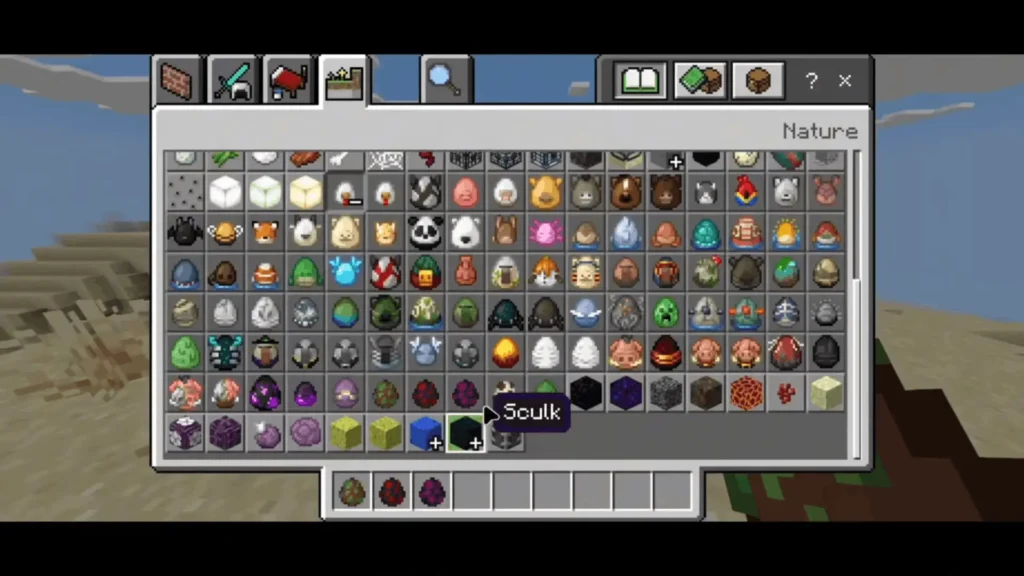
The fastest method: switch to Creative with /gamemode creative, find Jenny Belle’s spawn egg in the Spawn Eggs tab, place it on solid ground, and switch back with /gamemode survival. Under 60 seconds. No impact on trust progression. [See our spawn guide] for natural discovery strategies.
First Companion Interactions
Right-click Jenny on Java or long-press on Bedrock to open the interaction menu. Give her immediately, flowers or emeralds work well for Jenny Belle. This activates the trust progression system. Five trust stages exist: Stranger, Acquaintance, Friend, Close Friend, and Companion. Each stage unlocks new interactions and dialogue.
The most common new player mistake: exploring with Jenny for an hour without using the interaction menu. The mod rewards deliberate engagement, not passive proximity.
Companion Commands and Home Base
At Friend trust level, three commands unlock: Follow, Stay, and Home Base. Assign Home Base within your first session. Players who do this report noticeably richer dialogue within the first in-game week, location-specific dialogue lines accumulate faster when Jenny has a fixed base rather than constant follow mode.
Survival Gameplay Benefits
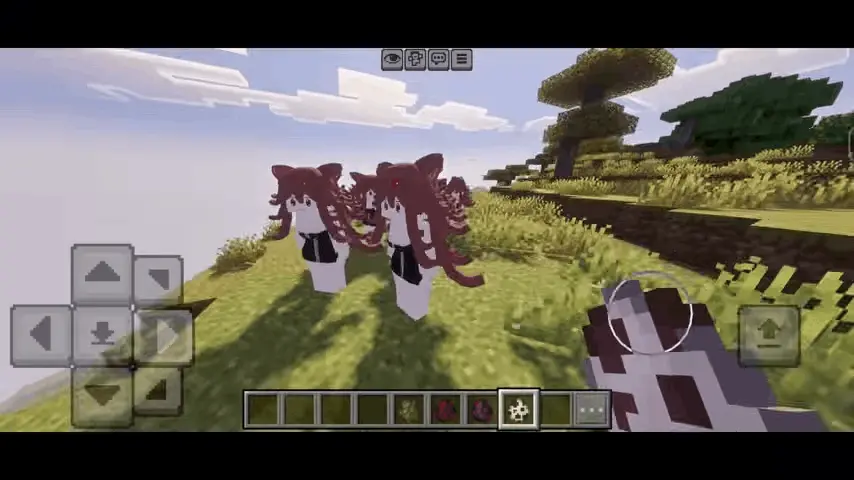
At Friend trust level, Jenny issues proximity alerts for nearby hostile mobs before you visually detect them. This is genuinely useful in caves, not cosmetic. Ellie Walls additionally alerts you to resource deposits during mining. Check our characters guide for which companions offer the strongest survival utility per playstyle.
Jenny Mod Java vs Bedrock Gameplay Differences
| Feature | Java Edition | Bedrock / MCPE |
|---|---|---|
| Character roster | 15 companions | 7 companions |
| Dialogue lines | 200+ per character | 80+ per character |
| Combat AI | Full | Basic |
| Trust system | Full 5 stages | Simplified |
| Home Base command | Yes | Yes |
| Natural world spawning | Yes | Limited |
| Adult content option | Yes (No Blur) | Safe Mode only |
| Forge required | Yes (1.12.2) | No |
| Best for | Full experience | Beginners, mobile |
Best Settings for Smooth Jenny Mod Gameplay
Best Java setup: 6GB RAM allocated in Forge launcher, render distance 10 chunks, Optifine HD_U_G5 enabled, graphics set to Fast. Runs cleanly on mid-range hardware with smooth companion animation.
Best Bedrock setup: 8 chunks render distance, all experimental toggles enabled, 64x resource pack maximum. Delivers stable 54 to 60 FPS on iPhone 13 and iPad Air 5th gen.
Low-end PC: 4GB RAM, 6 chunks render distance, particles Minimal. Jenny’s companion AI processes within 16 blocks; low render distance does not affect her behaviour.
Compatible shaders: BSL Shaders and Complementary Shaders both confirm compatibility with Optifine HD_U_G5. Avoid Sildur’s Vibrant Shaders on high settings — texture conflicts with companion models reported in late 2024 testing.
Common Problems When Using Jenny Mod
Mod not loading — Wrong Minecraft version or missing Forge. Confirm your launcher profile targets 1.12.2 specifically. Also, verify Java 8 is selected in Installation settings, not Java 17 or 21.
Companion not appearing on Java — Conflicting NPC mod suppressing spawns. Test with Jenny Mod as the only active mod. Custom NPCs and Minecraft Comes Alive are the most frequent conflict sources.
Companion not appearing on Bedrock — Experimental features not enabled before world creation. Create a fresh world with all experimental toggles active from the start.
Minecraft crashes — Insufficient RAM or mod conflict. Allocate at least 6GB in your Forge launcher profile. Remove mods one at a time to identify conflicts if crashes persist.
Bedrock import fails — Browser auto-decompressed the .mcaddon to .zip. In Safari settings on iOS, disable “Auto-unzip downloads” before downloading addon files.
Best Gameplay Tips for Beginners
Start with Jenny Belle, the easiest trust progression and broadest interaction content. Gift her preferred items (flowers, emeralds) daily rather than randomly; correct gifting accelerates trust by approximately 30%. Use Optifine zoom (key ‘C’) during exploration to spot Jenny’s model at a distance. Pair Jenny Mod with Biomes O’ Plenty for richer companion spawn environments, no confirmed conflicts in the 2026 build. Always back up your saves folder before adding any new mod. Make sure to download Jenny Mod safely from CurseForge to avoid broken files or malware.
Conclusion
The most common mistake new players make is treating Jenny Mod passively. Nothing happens by just walking around. The mod rewards deliberate engagement, daily gifting, consistent interaction, Home Base assignment in the first session.
Do that for two in-game weeks with Jenny Belle, and the experience becomes genuinely different. Skip it, and the mod feels like a novelty that wears off in an afternoon.
For Java: Forge 1.12.2 recommended build, Java 8, Optifine HD_U_G5. For Bedrock and mobile: enable all experimental features before world creation, activate both packs. For everyone: gift immediately, assign Home Base early, explore the [full characters guide] to plan your roster. Find out more about the creator behind Jenny Mod and the story behind it.